If you're a developer or content creator, you're likely paying for at least five software subscriptions every month - Figma, Adobe, Grammarly, Excel, Zapier. Add them up and you're looking at $1,500 to $2,000 a year without even noticing.
In 2026, a handful of AI-powered tools have matured enough to replace some - or all - of these subscriptions. This post covers 30 days of real testing across all five categories: no demos, no sponsored picks, just honest results on whether each AI alternative is actually ready.
1. Figma → Framer AI (Design Tools)
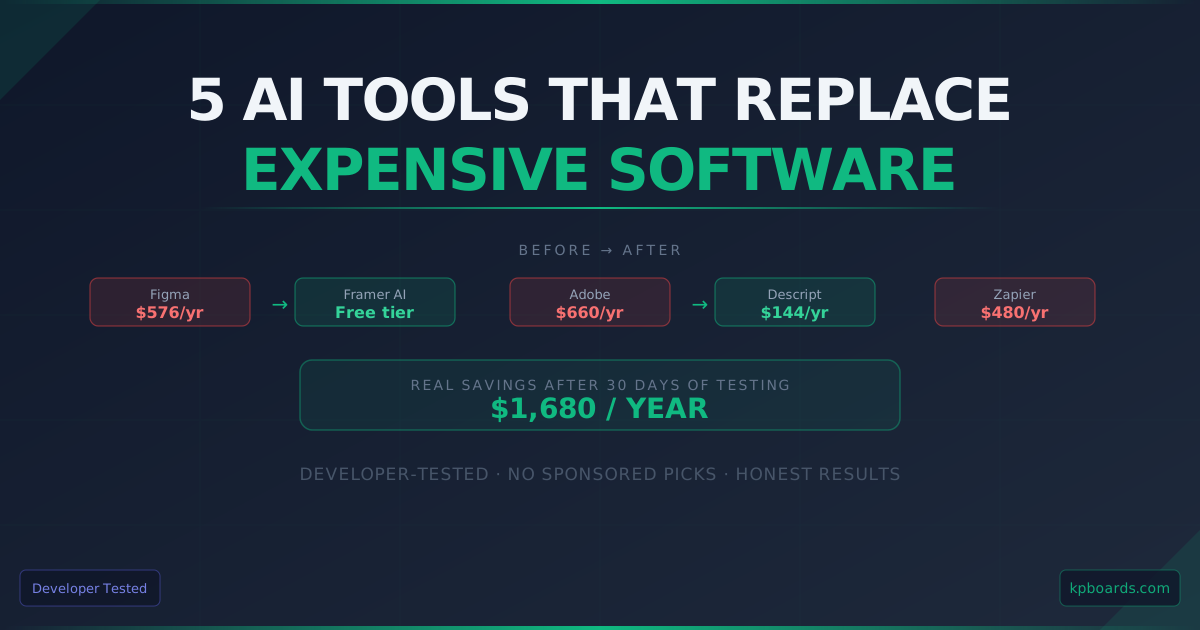
Figma pricing has increased significantly; team plans now sit around $576/year. Framer AI generates full layouts from text prompts with smart auto-layout and component placement.
Test result: Framer is measurably faster for wireframing and early-stage client work. What takes 20 minutes in Figma takes 5 minutes with Framer's AI layout generation.
Honest gap: Figma's dev mode - inspect panel, CSS export, component specs - remains superior for developer handoff. If you're handing designs to other developers, Framer isn't production-ready for that workflow yet.
Verdict: Use Framer for discovery and wireframing; keep Figma for production. Downgrade Figma tier → save ~$400/year immediately.
2. Adobe Premiere → Descript (Video Editing)
Adobe Premiere at $660/year is the industry standard but overkill for many creators. Descript removes filler words, cuts silences, and edits via transcript - all AI-driven.
Test result: For podcast and talking-head content, Descript is faster and significantly cheaper. Upload a 10-minute raw recording, AI processes it in under 2 minutes - every "um", "uh", and dead pause removed automatically.
Honest gap: For screen recordings and multi-track visual timelines, Premiere's export quality is noticeably better. If you make code tutorials or product demos, Premiere is still the stronger choice.
Verdict: Switch to Descript if your content is mostly voice or face-cam. Keep Premiere for complex visual work → save $500/year if it fits your workflow.
3. Grammarly → Claude (Writing Tools)
Grammarly Premium at $144/year: frictionless inline suggestions everywhere you type. Claude: consistently produces better output quality - stronger sentences, cleaner flow - but requires copy-paste.
Test result: Claude won on writing quality in every head-to-head test. Same paragraph, same goal: Claude's output was stronger every time. No exceptions.
Honest gap: Grammarly wins on convenience - it works automatically everywhere without friction. If you write across ten different tools throughout the day, that friction is real and it matters.
Verdict: Switch to Claude for long-form sessions (docs, articles, posts); keep Grammarly if you need real-time inline correction across multiple tools. Developers writing documentation: Claude is the clear call → save $144/year if already on Claude Pro.
4. Excel/Microsoft 365 → Julius AI (Data Analysis)
Microsoft 365 at ~$100/year covers basic spreadsheet needs. Julius AI: upload a CSV, ask questions in plain English, get charts and written analysis back.
Test result: Julius surfaced a data anomaly I had missed; analyzed 6 months of revenue data in under 30 seconds with clear visualization. Fast and surprisingly accurate.
Developer-specific insight: Julius has an API - you can pipe data analysis directly into your own applications, not just use it as a spreadsheet tool. This changes the value proposition entirely, and I haven't seen any review mention it.
Verdict: Switch for 90% of typical data analysis tasks; the API is the key differentiator for developers → save $100/year plus unlock programmable analysis.
5. Zapier → n8n + AI (Workflow Automation)
Zapier Professional at $480/year is the automation standard but costs scale with usage. n8n: open-source, self-hostable, free if you already run a VPS; native AI nodes built in.
Test result: Built the same workflow (email → Claude summary → Slack notification) in n8n in 20 minutes; cost per run is zero. In Zapier, that same workflow costs $0.10 per run - at my volume, about $15/month.
Honest gap: n8n requires technical setup - Docker knowledge, server management. Not a Zapier replacement for non-developers. The learning curve is real if you've never touched Docker.
Verdict: Switch if you're a developer with a VPS already running. Keep Zapier if you need a no-code solution → save $480/year, the biggest saving on this list.
Developer Checklist Before Switching
Three questions to ask before switching to any AI alternative:
- Does it have an API? - Developers need programmatic access, not just UI.
- Are the export formats portable? - Can you take your work elsewhere if needed?
- What's the lock-in risk? - If the company pivots or raises prices, can you migrate?
Tools that passed this checklist in testing: Julius AI (API available), n8n (self-hosted, full data ownership), Claude (standard output formats), Framer (for the specific use case tested).
The Bottom Line
Not every AI tool is ready to replace what you're currently paying for. But across these five categories, at least three are production-ready right now - and the combined savings exceed $1,600 a year from deliberate, tested switches.
The right question isn't "can AI replace this?" - it's "for my specific workflow, right now, which ones are actually ready?" The three-question checklist cuts through the noise faster than any recommendation list.