Why Most AI Video Tool Lists Are a Waste of Time
Most "top AI video tools" articles are written by someone who spent 15 minutes on a free trial and a lot of time copying feature bullets from product homepages. No real testing. No API coverage. No honest assessment of what actually works in a production pipeline.
This one is different. The 7 tools below were tested against real tasks: cutting silence, generating b-roll, auto-subtitling a 40-minute upload, cloning a voice and maintaining consistency across 20 videos, and turning a 12-minute explainer into three Shorts without touching a timeline.
Each tool is evaluated the same way: what problem it actually solves, where it genuinely breaks down, and whether it has an API - because if a tool doesn't have programmatic access, it belongs in a different list.
How These Tools Were Evaluated
- Task-based testing, not feature checklists
- API availability: REST API, SDK, or headless mode?
- Automation potential: can it fit into a production pipeline?
- Honest limitations: what actually fails in real use
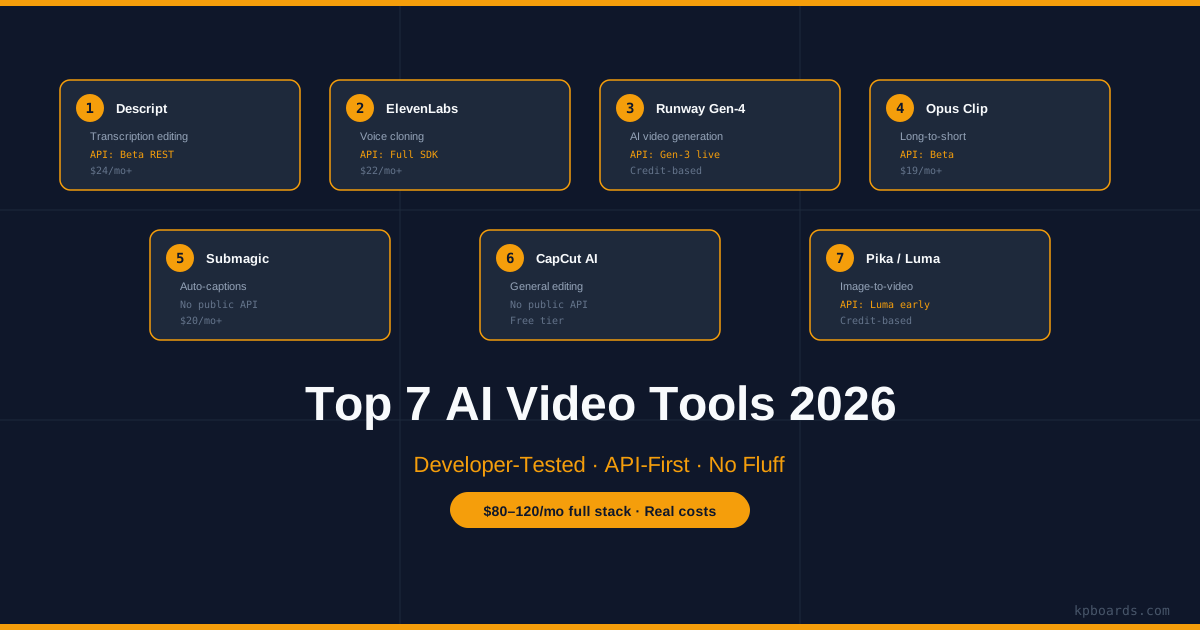
1. Descript - Transcription-Based Editing
Descript edits video the way you edit a Google Doc. You get a transcript, you delete words, the video cuts accordingly. That's the pitch, and it mostly works.
What It Does Well
Silence removal is genuinely fast. Upload a 30-minute raw recording, run Overdrive, done in under two minutes. The filler word removal feature is good enough to use on real content without babysitting every cut.
Honest Limitation
The AI voice clone - Overdub - requires a minimum of 30 minutes of clean source audio to produce something that doesn't sound broken. Less than that and it's not usable for production content.
Developer Angle
Descript has a REST API in beta. It covers project creation, media upload, and export - not full editing operations via API yet.
For pipeline automation - upload raw footage, trigger processing, retrieve output - it's functional. Rate limits are documented. Pricing tiers start at $24/month for API access.
2. ElevenLabs - Voiceover Generation
If you're running a faceless channel, ElevenLabs is not optional. It produces the best AI voiceover available right now, and the gap between ElevenLabs and everything else in 2026 is still meaningful.
What It Does Well
Voice cloning from as little as 60 seconds of audio. Multilingual synthesis. Emotional control via the v3 model. For long-form narration, the consistency across takes is good enough that you can regenerate a single sentence without the listener noticing the splice.
Honest Limitation
The v3 model is slower than v2. If you're generating 15 minutes of audio and iterating on the script, the latency adds up. Generated voices also occasionally over-articulate technical vocabulary - acronyms and product names sometimes get mangled and need phonetic overrides.
Developer Angle
ElevenLabs has a full REST API and official Python and Node.js SDKs. This is the most developer-friendly tool on this list. You can build a script-to-audio pipeline in under 50 lines.
from elevenlabs import ElevenLabs

client = ElevenLabs(api_key="YOUR_KEY")
audio = client.generate(
    text=script_text,
    voice="your_cloned_voice_id",
    model="eleven_turbo_v2"
)
# stream or save to file
Rate limits scale with plan. Concurrency is available on Creator tier and above.
3. Runway Gen-4 - AI Video Generation
Runway is where you go when you need video that doesn't exist and you can't screen-record it. Gen-4, released in early 2026, significantly improved temporal consistency - objects no longer morph between frames as aggressively as they did in Gen-3.
What It Does Well
Text-to-video for abstract or atmospheric b-roll. Data visualization sequences. Cinematic establishing shots where photorealism isn't critical. For faceless tech content, it's most useful for intro sequences and section transitions.
Honest Limitation
It still fails on text rendering inside generated video. Any prompt asking for on-screen text, code, or UI elements produces unusable output. Don't try it. At 5 - 10 seconds per generation, iterating on a single clip also takes significant time and credits.
Developer Angle
Runway Gen-3 API is live: REST endpoints, async job polling, webhook support. Gen-4 API is on a waitlist as of April 2026. Pricing is credit-based - budget carefully for production use.
4. Opus Clip - Long-to-Short Repurposing
Opus Clip does one thing: takes a long video and extracts short clips. It uses transcript analysis and visual attention scoring to find moments most likely to perform as Shorts or Reels.
What It Does Well
The viral score isn't useless. It correctly identifies high-energy moments, quotable lines, and visual peaks better than manually scrubbing a timeline. Auto-reframing for vertical format is solid. The caption style options are actually good - it ships with presets that match current TikTok aesthetics.
Honest Limitation
It cannot understand context. A clip that scores high because of energy might be completely out of context without the preceding 20 seconds. You always need a human review pass.
Developer Angle
Opus Clip has a beta API covering upload, process, and clip retrieval. It's not production-stable yet. Use it manually while the API matures.
5. Submagic - Auto-Subtitles and Captions
Submagic is a specialized subtitle tool. Upload video, get animated captions with word-level highlighting, emoji placement, and speaker detection. It does this better than CapCut's built-in subtitle feature.
What It Does Well
Caption presets match current platform aesthetics without requiring design work. Speaker detection is accurate enough for two-person formats. Export options are flexible - SRT, MP4 with burned captions, or individual clip segments.
Honest Limitation
It's a web app, not a pipeline tool. There is no public API.
Developer Angle
For programmatic subtitle generation, use AssemblyAI ($0.00025/second, speaker diarization, production-grade) or run Whisper locally (free, open-source, Python-native). Submagic is the right choice for manual production runs where caption quality matters.
6. CapCut with AI Plugins - General Editing
CapCut is the general-purpose editor that has become the default for short-form video. The AI plugins - background removal, auto-highlight, voice changer, text-to-speech - are competent and fast.
What It Does Well
It's free at the level most creators operate at. The auto-highlight feature is surprisingly good for finding the best 60 seconds of a raw clip. The text-to-speech voices are acceptable for lower-stakes content.
Honest Limitation
CapCut is owned by ByteDance. That's a real operational risk for anyone building infrastructure around it - platform availability in the US/EU is legally uncertain as of 2026. Don't build pipeline dependencies on it.
Developer Angle
No public API. For anything you need to automate, FFmpeg + Whisper + a Python script will outperform CapCut and actually be reproducible across environments.
7. Pika / Luma Dream Machine - Image-to-Video
Pika and Luma both convert images to short video clips. Luma's Dream Machine has better motion quality for product-style visuals. Pika handles character animation slightly better.
What They Do Well
Take a static image - a diagram, a screenshot, a generated graphic - and add cinematic motion. For faceless content, this is useful for making static assets feel alive without recording new footage. A 3-second animated version of an infographic performs better in a video than a static hold.
Honest Limitation
Neither is reliable for clips longer than 5 seconds. Temporal drift and unintended object deformation start appearing at 8 - 10 seconds. Keep clips short.
Developer Angle
Luma has a REST API in early access - request it now, the waitlist is real. Pika has no public API as of April 2026. For production image-to-video automation, Luma is the only viable choice.
Recommended Stack for Faceless YouTube Developers
| Workflow Step | Tool | API? |
|---|---|---|
| Voiceover | ElevenLabs | Yes (full SDK) |
| Transcription / Edit | Descript / Whisper | Beta / OSS |
| B-Roll Generation | Runway Gen-3 | Yes |
| Image-to-Video | Luma | Early access |
| Auto-Subtitles | AssemblyAI | Yes |
The complete stack costs roughly $80 - 120/month for moderate production volume. Most of that is ElevenLabs and Runway credits. That's the real number - not the $0 claims you see in other listicles.
Frequently Asked Questions
Which AI video editing tool has the best API in 2026?
ElevenLabs has the most mature API with official Python and Node SDKs. Runway Gen-3 API is solid for video generation. Descript's API is in beta but functional for basic pipeline automation use cases.
Can I automate my entire faceless YouTube pipeline with AI tools?
Almost entirely. ElevenLabs (voiceover) + Whisper (transcription) + Runway (b-roll) + AssemblyAI (subtitles) can be piped together with Python. Editing and pacing still benefit from human review, but most production overhead can be automated.
Is CapCut safe to use for YouTube in 2026?
Fine for one-off editing. Don't build production pipeline dependencies on it - ByteDance ownership creates real platform risk in the US/EU market.
What's the cheapest way to auto-subtitle YouTube videos?
OpenAI's Whisper running locally - free, open-source, and accurate enough for production. If you need speaker diarization or prefer not to run models locally, AssemblyAI at $0.00025/second is the production-grade choice.
Conclusion
This list wasn't written for people who want to click through 10 tools and pick the one with the nicest UI. It's for developers building real content pipelines who need to know which tools have APIs, where they actually break, and what the real costs look like.
The stack recommended above has been tested in production. The $80 - 120/month figure is real. Developer pricing breakdowns for each tool and the automation scripts are in the linked video and the description below.