This month Anthropic updated the entire Claude lineup with Claude 4.5 and Claude 4.6. As someone who uses Claude Code daily to build kpboards.com, here are my practical observations after months in production.
The New Model Lineup - Haiku, Sonnet, Opus
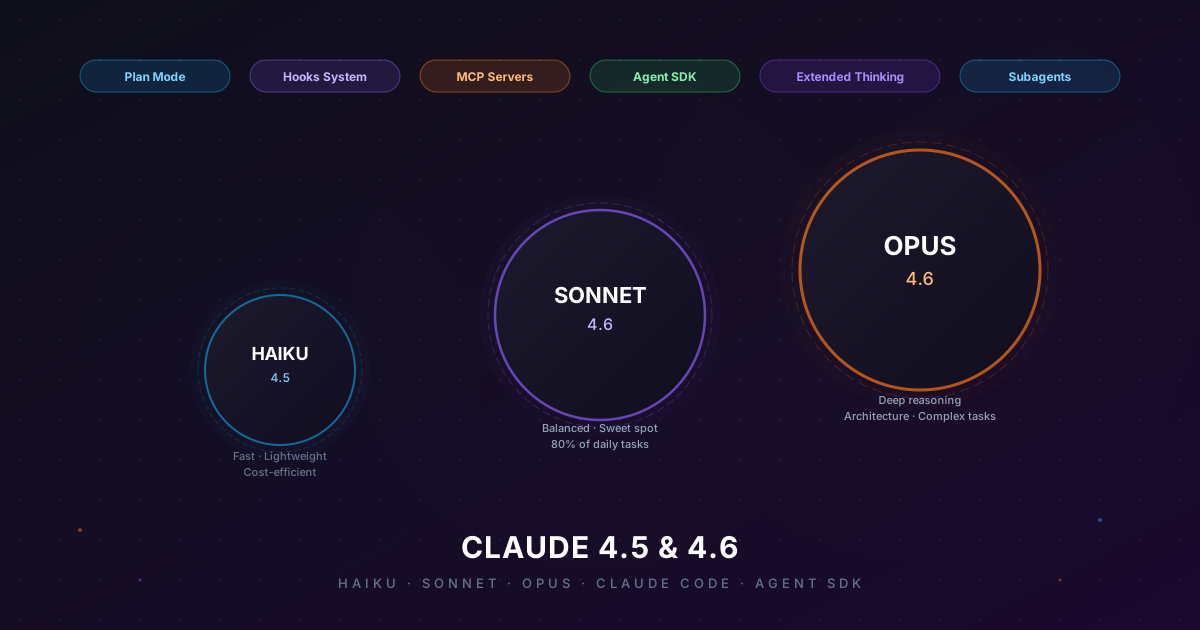
Three active models in the Claude 4 family:
- Claude Haiku 4.5 (
claude-haiku-4-5-20251001) - Fast, lightweight, most cost-efficient. Best for simple, repetitive tasks or low-latency requirements. Use as a subagent for file reading and code search. - Claude Sonnet 4.6 (
claude-sonnet-4-6) - The sweet spot: balanced capability and cost. 80% of my daily tasks run on Sonnet. Writing code, debugging, reviewing - Sonnet handles it well. - Claude Opus 4.6 (
claude-opus-4-6) - Most capable for deep reasoning, architecture design, and complex debugging when the root cause isn't obvious.
All three belong to the Claude 4 family - a generation with notably better reasoning and instruction-following than the previous Claude 3.x series.
Claude Code - The Most Notable Improvements for Developers
For developers, Claude Code (the CLI tool) is where improvements are most visible in daily workflow.
Plan Mode
Before writing code, Claude can now create a detailed plan - reading code, proposing an approach, and asking for confirmation before executing. For complex tasks spanning multiple files, this is a game changer.
Instead of Claude autonomously editing 10 files and then you discovering the problem, Plan Mode lets you review the entire approach upfront. I use Plan Mode for any task estimated to take over 30 minutes. It saves a lot of context window usage and back-and-forth.
Hooks System
Claude Code now supports hooks - shell commands that automatically run before/after specific events:
- After editing a file → auto-run linter + type-check
- Before committing → auto-run full test suite
- After creating a component → run SEO reviewer
- Before deploying → run build check
Hooks turn Claude Code into a workflow with guardrails rather than just a chat interface. Errors are caught immediately after code generation, not after pushing to production.
MCP Servers
Model Context Protocol (MCP) lets Claude connect to external tools and services directly within a conversation. With my current setup, Claude can:
- Query Supabase database directly
- Deploy to Vercel and check build logs
- View Stripe payments and customers
- Read GitHub issues and PRs
Instead of copy-pasting data back and forth, Claude retrieves context from services directly and works with real data.
Subagents
Claude Code can spawn specialized sub-agents - each with its own tool set, running in parallel. A complex session can have:
- 1 Haiku agent reading and searching code
- 1 Sonnet agent implementing a feature
- 1 Sonnet agent running an SEO review in parallel
Clearly faster than doing it sequentially. And since each subagent has its own context, the main conversation doesn't get bloated.
Agent SDK
Anthropic launched the Claude Agent SDK - a framework for building complex AI agents in your own code. Instead of writing prompt engineering from scratch, the SDK provides:
- Orchestration for multi-step tasks
- Type-safe tool use with TypeScript
- Conversation and context management
- Built-in error handling and retry logic
If you're building AI features into a product - chatbots, automation, data analysis pipelines - this is worth reading the docs carefully before building from scratch.
Extended Thinking
Some models support "extended thinking" - Claude spends extra tokens thinking before responding. Useful for:
- Complex math and logic problems
- Debugging when the root cause isn't obvious
- Multi-step reasoning with many dependencies
Note: Don't enable by default - it costs significantly more tokens. Only use when the task genuinely needs deep reasoning, not for ordinary code generation.
Model Selection Guide
| Task | Recommended Model |
|---|---|
| Grep/search, file reading, summarizing | Haiku (or direct Grep/Glob) |
| Simple refactor, rename variable | Haiku |
| Writing unit tests for clear functions | Sonnet |
| Implementing features from clear specs | Sonnet |
| Code review, security audit | Sonnet |
| Debugging with clear error messages | Sonnet |
| System design, architecture | Opus |
| Flaky or obscure bugs | Opus |
| Plan mode for large tasks | Opus |
Personal Take After Months of Daily Use
Favorite features: Plan Mode + Subagents. They let you tackle large tasks without worrying about the context window running out mid-way. Previously you had to manually split tasks; now Claude orchestrates that automatically.
Room for improvement: The MCP ecosystem is still maturing - some servers have incomplete docs and first-time setup takes time. But Anthropic's development pace is fast, with notable updates every month.
Bottom line: For web app developers, Claude 4.6 Sonnet is currently the best default. 4 - 5x cheaper than Opus, but produces equivalent results in 80% of cases. Use Opus when Sonnet fails after 2 attempts.
Which model are you using in your dev workflow? Share in the comments or read more posts about AI and development.